Dec 172011
 

For lovers of Apple products both old and new, there is a new web site with beautiful photos and videos for you to enjoy. Created by Jonathan Zufi of Atlanta, the Shrine of Apple exists to “…  showcase the entire spectrum of products that Apple have sold to the public since 1976 – every product Apple Inc has ever produced, in the highest quality and definition possible.”  These are not the same PR pictures you’ve seen for years on dozens of different web sites – they are original, capturing every detail and nuance, and the quality is top notch. Check out their profile of the PowerBook 100 to see for yourself.

Take a moment to check out the Shrine. It’s just starting out so the collection is far from complete but it will be fun watching the site grow to include more and more Apple products. I am especially eager to see a System 7 retail box and its contents added since my first job at Apple was as a System 7 support specialist.


Share
Sep 072011


Recently I was asked for advice on how to troubleshoot a Color Classic that won’t power on.

There are a lot of great troubleshooting resources across the internet that address this topic with helpful advice. This post isn’t meant to replace them but simply to consolidate the recommendations I’ve found helpful in the past. Hopefully it will help you get your CC up and running!

1. First verify you are using a known good power outlet and cable. Remove any surge protectors or power strips as well as any external peripherals from the CC like attached hard drives, printers, or modems.

2. Be certain the power switch on the back of the computer is in the ON position (top part is pressed in). Make sure the keyboard is attached and firmly press the power button on the keyboard.

3. Reset PRAM (hold down command-option-P-R while pressing the power button, continue holding these keys down until the computer chimes at least 3 times, then release).

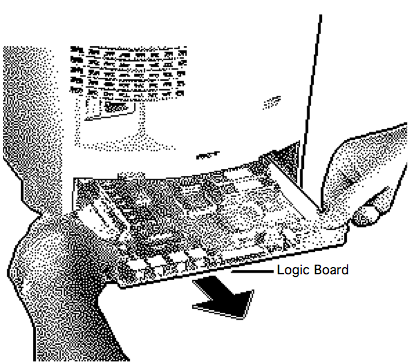
4. Unplug the power cable from the CC. Remove the logic board by taking out the two retaining screws on the back panel, then pressing on the tab at the top and pulling the panel out. Grasp the logic board firmly on each side and pull out directly.

a. Use canned air to blow dust accumulation from the logic board if necessary. Avoid the temptation to vacuum it since the static electricity can ruin the logic board.
b. Clean the contacts at the front edge with a cotton swab moistened with isopropyl alcohol.
c. Clean the socket inside the CC the logic board slides into with a cotton swab moistened with isopropyl  alcohol.
d. Remove the memory SIMMs (and if present, the VRAM) and clean the contacts with a cotton swab moistened with isopropyl  alcohol. Carefully reinsert them and be certain they snap securely into their upright position.
e. Press the CUDA switch briefly on the logic board (the tiny button near the ADB ports) and release.
f. Reseat the logic board by sliding it in and making sure it snaps securely into place. Remove and reinsert it a few times to help insure a clean connection.

Plug in the CC and see if it starts up.

5. If the CC still won’t start up unplug the power cord, remove the logic board and take out the 3V.6 battery on the logic board. Reinsert the logic board, reattach the power cable, and try again.
6. Sometimes the CC needs at least 24 hours with power attached and the switch on the back in the ON position before it will revive.

Still no joy? Remove the logic board and inspect it for traces of leakage around the capacitors (dark areas). If you see evidence of leakage if may be shorting the trace connections on the logic board. Believe it or not, a trip through the dishwasher is recommended for this. I won’t be the one to guide you down that road, though, I’ll leave it to those who have done it. See these great forums for assistance:

Good luck and feel free to post comments and results below with your experiences troubleshooting the Color Classic.

Share
Jun 112010
 

PowerBook 180c from the UK

The PowerBook 180c was Apple’s first PowerBook with an active matrix screen capable of displaying 256 colors. Introduced in June of 1993  it cost $1K more than it’s monochrome counterpart, the PowerBook 180. As lowendmac notes, the gorgeous display had took a heavy toll on the Ni-Cad battery, reducing it’s usage to about an hour before requiring recharging.

When I worked at Motorola I was loaned a 180c by Apple for a month or so, and loved it. I quickly realized that I needed to always carry a power adapter and find the chair close to power outlets in the meeting rooms. Recently I acquired a “working” 180c from an ebay auction, and after it’s transatlantic trip from the UK I set about testing it.

My first discovery was that it didn’t arrive with a power adapter (should have read that auction description a little closer). My second discovery was that the battery hadn’t been removed from the computer in at least a decade. When I was finally able to pry it carefully out I found a blue crystalline substance in the battery bay and on the outside of the battery terminals where the electrolyte has leaked out and hardened. When I opened the port cover on the back of the computer I discovered the same substance had leaked through the port openings.

leaking PowerBook battery

Leaking PowerBook battery electrolyte damage

After removing the battery I attempted to start up the PowerBook using a PowerBook 170 adapter I had on hand, and was pleased to hear a startup chime. My thrill was short-lived however, since the computer refused to proceed any farther, just repeatedly sounding a startup chime. A quick search of the internet revealed that this is a common symptom when you try to use a power adapter not intended for the 180c. The 180c needs a 24 watt adapter (model  M5652 or M4462). Fortunately I was able to locate an inexpensive original 24 watt adapter from retrotechnology.com.

Once I had the proper adapter I started up the PowerBook and it proceeded to a happy Mac screen and loaded the finder with just one issue – the top quarter of the screen isn’t illuminated. Bending the display forwards flickers it on, so I am hopeful the issue can by adjusting or replacing the internal display cable that is prone to being pinched.

It looks like the 180c will be more of a project than I anticipated. A full take-apart is needed to remove the crystallized remnants of  electrolyte in the battery bay, inside the bottom case,  on the logic board, and the rear ports. Ni-cad battery electrolyte is potassium hydroxide, and recommended cleaning solutions I’ve seen include baking soda, vinegar, and coke. Further research indicates that the blue color of the substance I found indicates that it’s copper sulphate and the recommended cleaning solution is hydrogen peroxide.

Share
Jun 112010
 
3 Color Classics - front

3 Color Classics - front

My wife is thrilled when I turn the dining room table into a computer repair workshop. As you can see from the photos above the patients for this day included two Macintosh Color Classics that refused to start up. The Color Classic web server was temporarily taken offline to serve as my “known working” device to test parts from the other two.

One of the two nonworking CC’s was purchased for a song from ebay with a known faulty logic board but everything else was promised to be fine. This proved to be true – installing an LC575 logic board into it produced a healthy startup chime and a clear bright screen when booted from the internal hard drive . Since the system file on the HDD hasn’t been hacked it produced a bus error when trying to load the Finder, but that appears to be a software issue rather than a hardware one.

3 Color Classics - reverse

3 Color Classics - reverse

The second CC is one that previously worked fine and even has a rare Sonnet Presto Plus accelerator card installed. After sliding out the logic board and removing the accelerator card I could see very evident traces of leaking capacitors. I’ve located a working replacement logic board but it’s just a matter of time before it also succumbs to the ravages of time and suffers the same fate, so I guess I will need to brush up on my soldering skills.

Color Classic logic board and Sonnet Presto Plus

Sonnet Presto Plus accelerator and Color Classic logic board

The Color Classic web server is back online and I am still working on getting a spare backup ready to go to pinch hit in case of hardware failure. It is, after all, 17 years old. Back in 1993, when the Color Classic was released, Apple’s annual sales amounted to just under $8B, virtually all of it from sales of 3.3M Macs. In 2009 Apple’s annual sales were $36.5B, from 10.4M Macs, 54M iPods, and 20M iPhones.

Share
Jun 102010
 

I’ve had a pair of Macintosh Classic II computers awaiting diagnosis and repair for over a year now. Both suffer from the same issue – a checkerboard pattern on the screen that appears on startup and remains. After perusing the helpful forums over at the 68k Macintosh Liberation Army I determined the issue is almost certainly leaking capacitors.

Not long ago I was able to purchase a replacement Classic II logic board for a few dollars on ebay as an unused Apple Service part. I was thrilled that I might get at least one of the Classic II Macs back to health without having to remove and replace a bunch of capacitors with a soldering iron.

Above is a photo of the new and the old logic boards. It’s pretty easy to tell which is which. Sadly, though, the new logic board is not without problems. Although the Classic II now starts up properly there is no sound. I’ve reseated RAM and ROM modules without any change. Another tour through the 68KMLA forums reveals this is a common symptom of, you guessed it – leaking capacitors.

Share
