Apr 212010
 

6.0.8 system startup window

I took a few moments to launch Mini vMac and play with Mac OS 6.08 on my MacBook Pro that runs Snow Leopard. Since Snow Leopard will not let you write to or create HFS disk images I was limited to what was available on the 6.08 Disk Tools disk, namely the venerable Disk First Aid and Apple HD SC Setup.

I was very proud of myself for remembering that there is a secret key combination to expose the logging window of DFA so you can see what it is doing. Back in the early days DFA just worked it’s magic and expected you to wait patiently for the watch cursor to disappear and the application to report it’s cryptic results.

If you press Command-S while DFA is open a window underneath appears that displays the status of the DFA processes. Since this always begins  and ends with a date/time stamp and the message “Scavenging begun” or “Scavenging ended” I presume Command-S was chosen to display the Scavenging process.

Disk First Aid 1.4.3

Disk First Aid 1.4.3 with secret window revealed

Later versions of Disk First Aid by default display the disk examination and repair process, but back in the System 6 days you had to know the magical keycode to watch its inner workings as it churned away performing its diagnostics and repair.


Share
Apr 212010
 

powerbooksMy goal in collecting portable Apple computers isn’t to have one of every model, just to have one that personifies each major developmental step along the way. I have a nice collection started, but there’s several gaps I want to fill. Read on to find out what’s in the classicmacs.org portable collection already, and what I still scour craigslist and the LEM swap list for. Continue reading »

Share
Apr 152010
 

Which one of these fits a PowerBook 5300?

If you’ve assembled a nice collection of older Mac laptops, or if you just started a collection with a laptop that came without a power adapter, you may wonder what you need to power it.

Fortunately, Apple has a series of excellent articles in their KnowledgeBase that will point you in the right direction:

Share
Apr 142010
 

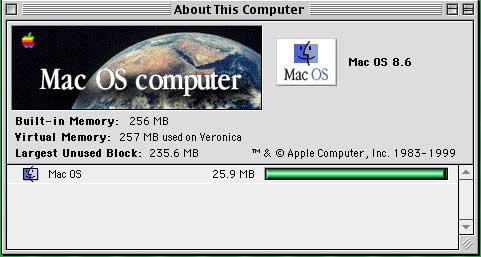
I completed my project to install 3 different versions of the Mac OS onto my recently acquired PowerBook G3 “Lombard.” Below are the resulting screenshots of the computer started into Mac OS 8.6, Mac OS 9.2.2, and Mac OS 10.3.9 “Panther.”

About this Mac - OS 8.6

"About this Computer" window under Mac OS 8.6

Startup Disk control panel - Mac OS 8.6

Startup Disk control panel from Mac OS 8.6

Continue reading »

Share
Apr 122010
 

Lombard

Last week I posted an article about acquiring a 333 MHz PowerBook G3 “Lombard” to add to my collection of classic Apple computers. During my research about this computer I discovered that it has the ability to operate under three different major versions of the Macintosh operating system: 8, 9, and X.

Thus was born my idea to configure the Lombard with the ability to boot into each of these operating systems so that it might be a self-contained demo of the evolution of the Mac OS from 8.6 (May, 1999) through 9.22 (December, 2001) all the way to 10.3.9 (April, 2005).
Continue reading »

Share