May 072026
 

I’m about halfway through David Pogue’s masterful history of Apple and learning more than I ever imagined. Particularly interesting is discovering when features were added to the system software.

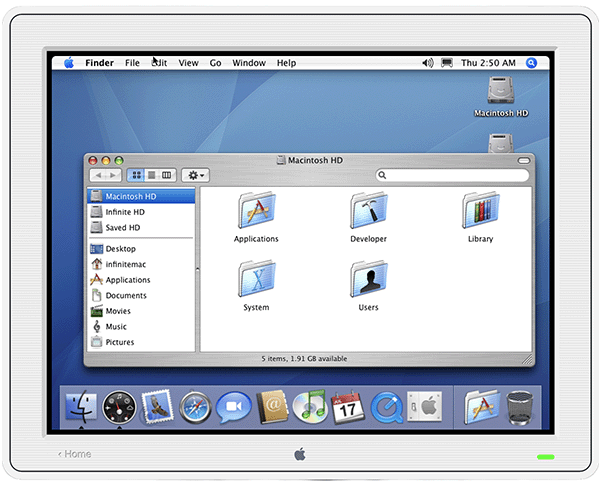
Coincidentally I came across a recommendation to visit infinitemac.org and discovered it’s a wonderful resource to experience the Macintosh OS all the way from System 1.0 to Mac OS X Tiger, and you can choose from a variety of Macintosh models. From the site description:

Infinite Mac is a collection of classic Macintosh and NeXT system releases and software, all easily accessible from the comfort of a web browser.

Pick any version of System Software, Mac OS, Mac OS X or NeXTStep from the 1980s, 1990s or early 2000s and run it within a virtual machine. An “Infinite HD” disk with representative software from that era is also available. You can also run a custom version with your choice of machine and disks and embed it into your own site. On some operating systems files and disk images can be imported and exported using drag and drop and virtual CD-ROMs can be mounted – refer to the welcome screen in each machine for more details.

Something I needed reminding of I discovered on this site: System 7.5.3 was the last version of the Macintosh operating system to be named “System …”

The following release was 7.6 and began the naming convention of “Mac OS …”

Share
Jul 252025
 

The Macintosh User Interface evolved from the Apple Lisa, a computer I’ve always longed to add to my collection. The Computer History Museum calls it Apple’s Most Influential Failure but readily acknowledges the groundbreaking effect it had on the way we interact with computers.

Now anyone with a web browser can experience this pioneering user interface and see what was revolutionary in 1983. Andrew Yaros’ LisaGUI.com lets you experience it firsthand, including the original Lisa apps. Spend some time here and then read about the Lisa OS development at folklore.org – one of my favorites is Rosing’s Rascals.

Share
Feb 162023
 

If every moment of your Macintosh experience has been on a version of the operating system released after 2001 you may have wondered what things looked like in years prior. The Version Museum has a lovely collection of screenshots you can view for a glimpse of life prior to Mac OS X, but pictures can’t do justice to what it was really like.

Now, thanks to the fabulous Infinite Mac project by Mihai Parparita you can experience Apple’s System 6, System 7, Mac OS 8, or Mac OS 9 with just a web browser on your modern computer.

These sites will promptly send you back in computing time:

https://system6.app – released in April of 1988 – Wikipedia article about System 6
https://system7.app – released in May of 1991 – Wikipedia article about System 7
https://macos8.app – released in July of 1997 – Wikipedia article about Mac OS 8
https://macos9.app – released in October of 1999 – Wikipedia article about Mac OS 9

Best of all, you don’t get to just experience the operating system. Each site is a virtual Mac that includes applications, games, utilities, and even AppleTalk so you can see what networking was like in the pre-internet days.

Hopefully, you’ll be inspired to find your own beige classic Mac and experience the joys of installing software from floppy disks and CD’s, pushing a beige non-optical mouse around, and using a clacky beige keyboard for some great retro Macintosh computing.

Share
Apr 022021
 

Stephen Hackett, the mastermind whose 512 Pixels is the home of the Aqua Screenshot Library (featured in my last post) has provided us with another beautiful treat, a catalog of every default wallpaper from Mac OS 10.0 “Cheetah” through macOS 11 “Big Sur.” Not only are they all downloadable, they are rendered in beautiful 5K resolution, so they will look great on your Retina display.

It’s a delightful way to visually travel through 20 years of the operating system that revolutionized the Macintosh user experience beyond anyone’s imagination back in 2001. And for those of us with a fondness for Mac OS 9, he’s got you covered with similar versions of those which are guaranteed to bring back memories of the 5 flavor translucent iMacs in brilliant lime, grape, strawberry, and tangerine. And blue dalmatian and flower power, of course.

Share
Oct 022018
 

I was recently reminded of a fabulous online archive by a notice that it had been updated to include images from Mac OS 10.14 (aka “Mojave”).

Stephen Hackett, author of 512 Pixels, has compiled a brilliant collection of images from each version of Mac OS X, beginning with the first public beta version (“Kodiak”) through each major upgrade. Each version features a page of screenshots of various aspects of the interface, including the dock, applications, system preferences, and much more. It truly is a veritable time machine that enables you to explore the history of the Mac OS X interface as it has evolved since the first public beta version in September of 2000.

Set aside some time to explore and appreciate the depth of detail in the Aqua Screenshot Library. If you start at the beginning you can join the original beta testers in wondering why there was an Apple in the center of the menubar (that didn’t do anything).

Share